





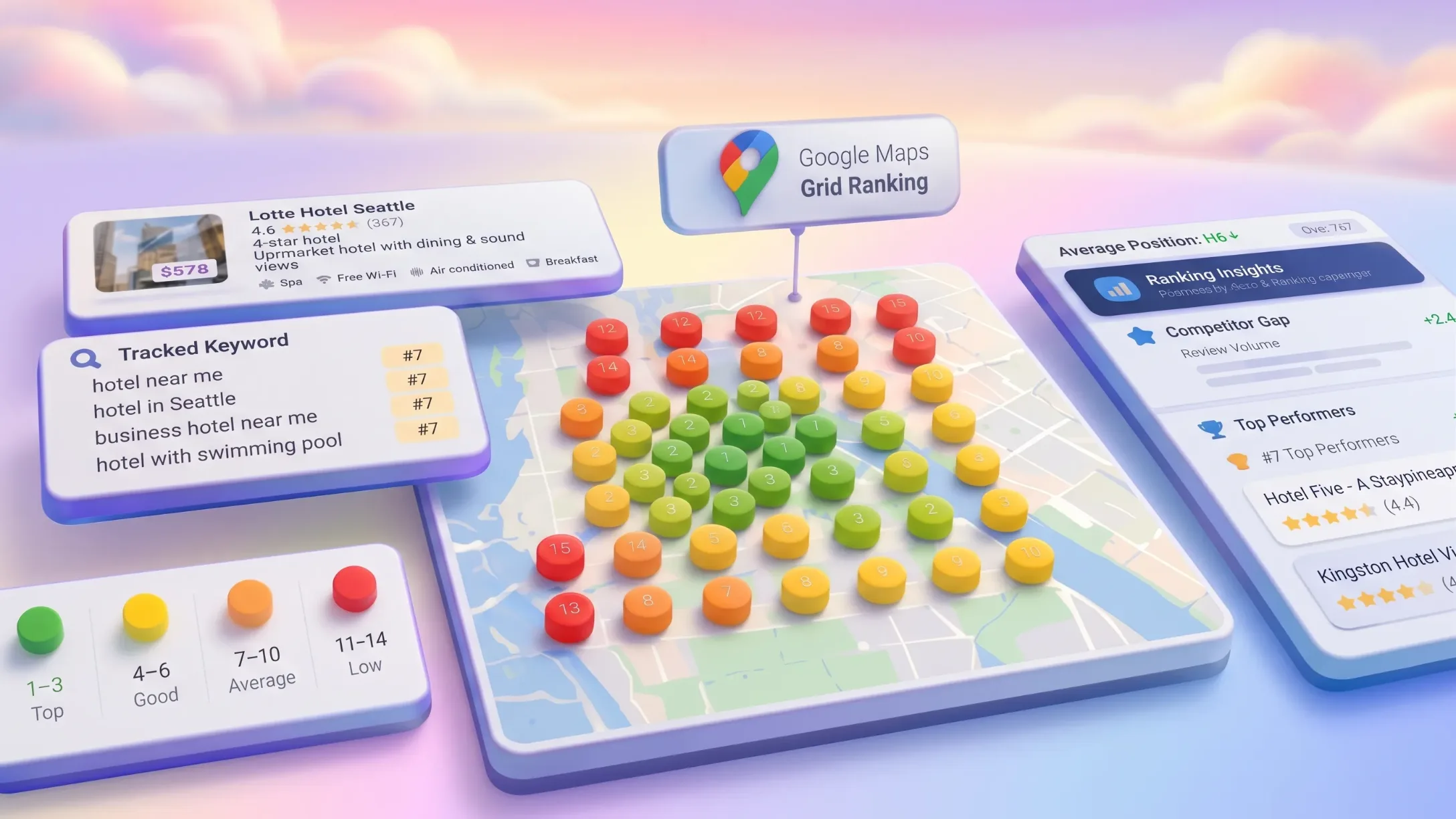
- Google Maps ranking depends on location. A business can rank near the top close to its address and fall several places a few streets away, so no single position describes a whole city.
- Relevance, distance, and prominence drive local results. Google doesn’t publish exact weightings, so treat claims that one profile field guarantees a ranking gain as opinion, not fact.
- Measure with a fixed local rank grid, not one search. Check the same queries from the same points on a consistent schedule, and log every material change beside the data.
- Track visibility and conversion separately. Grid positions show where you can be found; calls, direction requests, website clicks, and sales show whether visibility turns into demand.
- Fix accuracy and eligibility before chasing prominence. Correct the name, address, categories, hours, and duplicates first, then earn genuine reviews steadily without incentives or pressure.
- Test one change against a baseline. Compare the same queries, coordinates, and conditions, and check competitor movement before crediting any result.
- Service area businesses still face distance limits. Taking the address off the profile doesn’t remove proximity effects, so measure and target the zones you can serve profitably.
Google Maps ranking is where a business appears in Google Maps and local search results for a specific query, searched from a specific location. It is not one citywide position: a business can rank near the top close to its address and fall several places a few streets away. Measure it with a fixed grid of search points, then improve accuracy, relevance, and prominence.
How does Google Maps ranking work?
Google says local results are mainly based on relevance, distance, and prominence. These factors work together: a highly regarded business can lose visibility far from the searcher, and a nearby business can miss out if its profile doesn’t clearly match the search.
Google explains the core local ranking factors in its own guidance and notes that complete, accurate information makes a business more likely to appear in local results. You supply it through your Google Business Profile, the listing that presents your business on Google Search and Maps.
| Ranking factor | What it means | What a business can influence |
|---|---|---|
| Relevance | How closely a Business Profile matches a search | Categories, services, business details, website content |
| Distance | How close the business is to the searcher or stated location | Physical location and realistic service coverage expectations |
| Prominence | How well known or established a business appears online | Reviews, links, local citations, articles, directories, brand recognition |
Relevance depends on clear, consistent business signals
Relevance is how well a Business Profile matches what someone is searching for. Your primary and secondary categories, services, website, hours, address, and business description should tell one consistent story.
A plumbing company that lists only a broad category and a short description may be hard to match to searches for drain cleaning, emergency plumber, water heater repair, or leak detection. Adding the services it genuinely offers, backed by a clear website structure, reduces that ambiguity, though it doesn’t guarantee a ranking gain.
NAP consistency matters for the same reason: your name, address, and phone number (NAP) should match across your Business Profile, website, and major local citations, meaning listings of your business on directories and other sites. Small formatting differences are not always harmful, but conflicting addresses, old phone numbers, or duplicate listings create unnecessary uncertainty.
Distance sets a real geographic limit
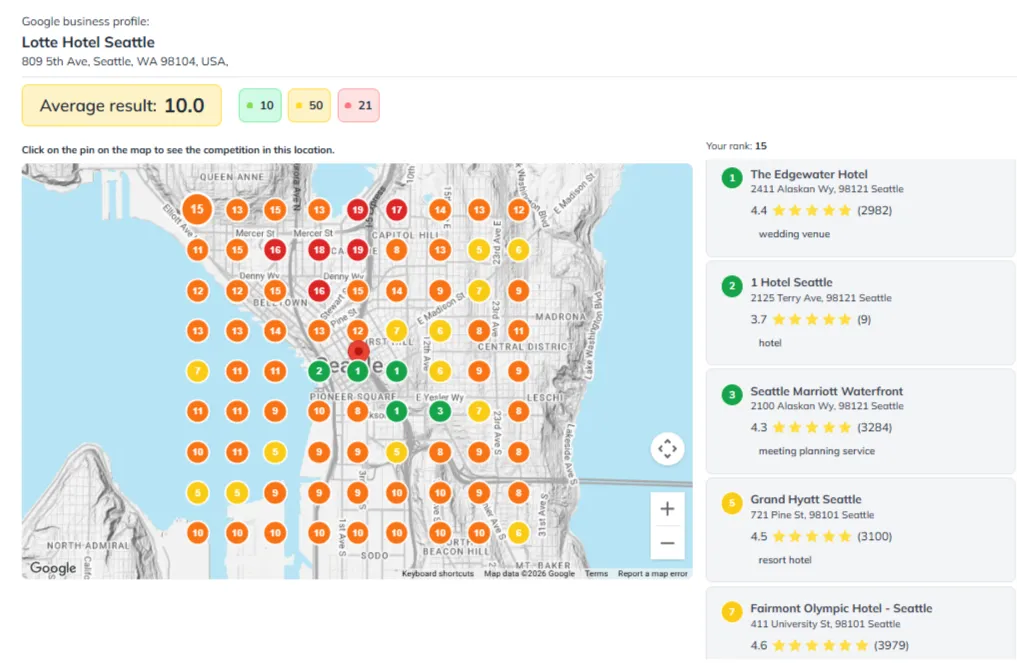
Distance is how close a business is to the searcher, or to the location named in the query, and businesses often underestimate it. A restaurant can rank strongly in its own neighborhood and barely appear across town, even with excellent reviews. That is how local discovery works, not necessarily an optimization failure.
A dentist on the north side of a metro area may rank well nearby but not in every suburb. More prominence may extend visibility at the edges, but it cannot make proximity disappear, so treat promises of citywide dominance from one address with caution.
Prominence reflects how well known a business is
Prominence is how well known a business is. Google says it draws on information such as how many websites link to the business and how many reviews it has, and that more reviews and positive ratings can help local ranking. Mentions in articles, directories, and local citations also shape how established a business looks online.
Use Google’s local ranking documentation to separate confirmed ranking concepts from vendor estimates. Google keeps its algorithm details confidential and does not publish exact weightings for categories, photos, posts, review wording, citations, or links, so treat claims that one profile field produces a specific ranking gain as opinion, not fact.
How to measure local visibility across a market
Local visibility is how often and where a business appears in local results across the area it serves. Measure it with a local rank grid rather than a single search.
A single manual search reflects one place, one moment, and one query, so ranking third from your office computer doesn’t mean you rank third across the market. Answer engines pose the same problem, which is why prompt research relies on repeated tests.
How a local rank grid works
A local rank grid is a set of fixed search points laid over a selected area. Each point records where the business appears for a query from that spot, so together the points show where you are visible, where competitors dominate, and where distance becomes a constraint.

| Measurement method | Best use | Main limitation |
|---|---|---|
| One manual search | Quick spot check | Cannot represent an entire service area |
| Average city rank | Broad directional summary | Can hide weak or strong neighborhoods |
| Local rank grid | Neighborhood-level visibility analysis | Requires consistent setup over time |
| Business Profile interactions | Evaluating customer response | Does not explain ranking position by itself |
A repeatable local rank tracking protocol
A repeatable protocol holds every variable you control constant, so a ranking change reflects real movement rather than a different search location or a reworded query.
- Select a fixed keyword set. Use service terms customers actually search, such as “roof repair,” “family dentist,” or “commercial electrician,” and separate broad from high-intent terms. The searches in your Business Profile performance report can help.
- Define the measurement area. Cover the business, priority neighborhoods, or the realistic service territory, not distant areas the business cannot practically serve.
- Keep grid points consistent. Use the same coordinates every time. Changing the grid size or point locations weakens trend comparisons.
- Record the result type. Note whether you measure Google Maps results, the local 3-pack (the short list of map results in Google Search, also called the map pack), or both, since they may not display identically.
- Track on a fixed schedule. Keep the interval constant and judge strategy on trends across several cycles. Reacting to day-to-day swings adds noise unless you are investigating an active issue.
- Log material changes. Record profile edits, category changes, review growth, website releases, address updates, and competitor changes beside the ranking data.
Why do rank trackers and personal searches show different results?
Rank trackers and personal searches often differ because the two searches are not equivalent. A rank tracker, a tool that checks positions automatically from set locations, gives a useful estimate, not every customer’s view. As a discussion on Reddit’s r/bigseo about checking Google Maps rankings notes, rankings vary by location.
A mismatch doesn’t automatically mean the tool is wrong: the person may have used a different location, device, or search history, or seen a changed result set. Compare the exact query, location, date, result type, and device before letting one search overrule a grid report.
How to connect Google Maps visibility to customer actions
A higher position raises the chance of being found, but it isn’t the same as gaining customers. Track visibility and conversion as separate layers to see where rankings turn into calls, visits, and sales. A business can climb the grid and still get few qualified leads if its category is too broad, its reviews raise concerns, its hours don’t match customer demand, or its landing page doesn’t answer the visitor’s need.
| Visibility layer | Conversion layer |
|---|---|
| Grid positions by neighborhood | Calls and call quality |
| Share of top local results | Direction requests |
| Competitor overlap | Website visits from the profile |
| Ranking changes by search term | Form submissions, bookings, and sales |
Your Business Profile performance report covers part of the conversion layer with interactions such as calls, direction requests, and website clicks; its profile views belong to the visibility layer. Call quality, form submissions, and sales come from your own website, phone, and CRM data.
This is where local SEO, the work of improving visibility in location-based searches, becomes a measurable operating system rather than a set of profile edits. Data pipelines, reporting rules, and structured website updates on a site architecture that stays findable help keep it reliable across locations and service lines.
How to improve Google Maps ranking without guesswork
Improve Google Maps ranking in order: fix profile accuracy first, build prominence with genuine reviews and consistent information, and test each change against a baseline.
Fix trust and eligibility problems first
Correct basic profile issues before expanding content or pursuing citations, because an inaccurate, duplicated, or unverified profile is hard to evaluate. Start with these checks:
- Confirm that the business name reflects the real-world name, not a list of keywords.
- Verify the location, which Google says makes a business more likely to appear in search results, and match the address format to your website and major directories.
- Choose the most accurate primary category, then add only secondary categories that represent genuine services.
- Review services, phone numbers, opening hours, appointment links, and website destination pages.
- Remove or resolve duplicate profiles where possible.
Keyword stuffing a business name can look tempting when competitors do it, but it is risky: it can reduce trust, trigger edits, or misrepresent the business. A clean profile is easier to maintain and defend.
Build prominence with evidence, not activity
Reviews matter because Google ties the number of reviews and positive ratings to prominence, but the goal is a credible record of real customers, not an arbitrary count. Ask for reviews after real customer interactions, with a simple, consistent request.
Stay within policy. Google’s Maps content policies prohibit reviews influenced by payments, discounts, or free goods or services, and treat pressuring customers for specific ratings or reviews as rating manipulation. Avoid scripts that pressure customers to use specific keywords or give only positive ratings.
Reply when a response can clarify service quality, resolve a concern, or show that the business is active. Keep the program steady: ten genuine reviews spread across several months may look more believable than a sudden burst in one week.
Accurate local citations, locally relevant links, and pages that support real services and locations also build prominence. Connect them: the Business Profile should lead to a relevant page that explains the service, and business information should match across the web.
Test changes before taking credit for results
Local ranking shifts have many possible causes: competitors change categories, new reviews arrive, Google refreshes data, and demand shifts with the seasons. We recommend a simple before-and-after test:
- Capture a baseline grid and customer action data before a major change.
- Make one meaningful change, or one tightly related group of changes.
- Wait for enough measurement cycles to see whether the pattern holds.
- Compare the same query set, coordinates, and reporting conditions.
- Review competitor movement before claiming a causal result.
If a business adds services, gains reviews, redesigns location pages, and changes categories in the same week, no single change can take credit for a later gain. Document each change well enough to learn what deserves more investment, the same discipline that separates attribution from incrementality testing in advertising.
What should service area businesses expect from Google Maps ranking?
A service area business, one that visits or delivers to customers rather than serving them at its own address, can appear in Google Maps without showing that address. It should not expect to rank equally across every city it covers.
Google tells these businesses to remove the address from their Business Profile, list service areas instead, and keep the overall area within about two hours’ driving time of their base. Taking the address off the profile does not eliminate distance effects.
A locksmith serving several suburbs may be relevant for emergency searches across a broad area, yet proximity and local competition still shape each result. Build the grid around actual travel zones, and if a distant area shows weak visibility and slow response times, question whether ranking there is worth pursuing. The practical question is not “Can we rank everywhere?” but “Which locations can we serve profitably, and where does local visibility support that plan?”
Checklist: where to start
Start with accurate data and a measured baseline, then test one meaningful change at a time.
- Audit your Business Profile name, categories, hours, services, and duplicates, and match your NAP across your website and major citations.
- Choose a fixed set of service terms, split into broad and high-intent groups.
- Set up a local rank grid over your realistic service area, with fixed coordinates.
- Record baseline grid positions and Business Profile interactions, then log every change beside the ranking data.
- Ask for reviews after real customer interactions, without incentives or pressure.
- Prioritize the areas you can serve profitably, not every city within reach.
What is Google Maps ranking?
Google Maps ranking is a business’s relative visibility in Google Maps and local results for a specific query and location. It is not a permanent citywide position. The same business can rank near the top in one neighborhood and much lower in another, so a single search or a single city average rarely shows how visible it really is across a service area.
How does Google decide which businesses appear in the local 3-pack?
Google says local results are mainly based on relevance, distance, and prominence. Relevance depends on how well your Business Profile matches the search, so choose the primary category that most closely describes your core business and skip unrelated categories added only to chase searches. Complete, accurate information, verification, links, and reviews also help Google understand and evaluate a business.
How many reviews do I need to rank higher on Google Maps?
There is no confirmed number. Google says more reviews and positive ratings can help local ranking, but it does not publish a review count or rating that guarantees a top position. Earn genuine reviews steadily after real customer interactions, reply where a response adds value, and never offer incentives, which Google’s Maps content policies prohibit.
Why does my business rank in one neighborhood but not another?
Distance is part of Google’s local ranking system, so a business can be close enough to rank well in one neighborhood and less competitive farther away. Stronger competitors near a given search point can also push it down. A local rank grid shows where the decline begins and whether it follows proximity, competition, or both.
Can a service area business rank without showing its address?
Yes. Google tells businesses that don’t serve customers at their address to remove it from the Business Profile and set service areas instead. The profile still needs accurate information and proper verification. Taking the address off the profile does not eliminate distance effects, so visibility can still vary across the area the business serves.
Can I pay Google to improve my organic Maps ranking?
No. Google states that there is no way to request or pay for a better local ranking. Paid advertising and organic local results are separate systems, so ad spend does not buy a higher unpaid position. Organic visibility depends on accurate business information, relevance, distance, prominence, and genuine customer signals.
How long does it take for Google Maps ranking to change?
There is no reliable universal timeline. Some profile updates may appear quickly, while broader ranking movement can take longer or may not happen at all. Measure the same queries from the same grid points across several measurement cycles before judging a change, and note anything else, such as new reviews or competitor edits, that could explain the movement.
Sources and References
- Google explains the core local ranking factors (support.google.com)
- Google’s local ranking documentation (support.google.com)
- The r/bigseo conversation about checking Maps rankings (reddit.com)
- Google Business Profile Help: Business Profile performance (support.google.com)
- Google Business Profile Help: service-area businesses (support.google.com)
- Google Maps content policy on incentivized reviews (support.google.com)
- Google Maps content policy on rating manipulation (support.google.com)
Ready to put this into practice?
Book a free 30-minute call. We will map where AI, automation and better data can make the biggest difference in your business, and what to do first.