






- A sitemap lists URLs; web architecture connects them. Plan hierarchy, navigation, and internal links around real user intents, then make the sitemap reflect that structure.
- Treat the XML sitemap as a controlled inventory. List only canonical, indexable URLs that return a successful response and that you want search engines to discover.
- Don’t use a sitemap to compensate for weak internal links. A page listed in the sitemap but missing from hubs, categories, and related content is still an orphan for visitors.
- Audit contradictions, then fix them in order. Compare sitemap membership with status codes, canonical targets, indexability, and internal links, and settle each page’s purpose before changing the file.
- Segment large sitemap programs. Group files by content type, locale, or template under a sitemap index, so you can trace failures to a feed, template, or release.
- Be conservative with faceted URLs. Index only filter combinations that serve stable, distinct user needs; keep sort orders out of the sitemap and usually exclude temporary inventory filters.
- Treat migrations as architecture changes. Validate old URLs, redirects, new canonicals, internal links, and replacement sitemap files as one release process.
Sitemap and web architecture should be planned as one system. Web architecture is the way a site’s pages are organized and linked; an XML sitemap is a controlled list of the URLs you want search engines to discover. A sitemap can expose URLs, but it cannot make a confusing site easy to explore, so get the structure right first and make the sitemap reflect it.
Treating the two as separate SEO tasks causes problems. When they agree, you can audit change, find weak areas, and manage large sites with less manual effort. When they conflict, the result is often duplicate URLs, orphan pages that no internal link reaches, wasted crawl activity, and unclear ownership.
What is the difference between a sitemap and web architecture?
Web architecture is the connected structure of a website, while a sitemap is a list that represents part of that structure. Architecture decides how pages relate and how people and crawlers move between them; a sitemap lists the URLs you want people or search engines to find.
Web architecture includes page hierarchy, information architecture, navigation menus, URL patterns, internal links, templates, and the relationships among content. An XML sitemap is a machine-readable list of URLs intended for search engine discovery. An HTML sitemap is a user-facing page that helps people reach the sections of a site. SEO.com’s overview of website architecture defines the discipline as the way pages are organized and connected, and it distinguishes the user-focused HTML sitemap from the crawler-focused XML sitemap.
The distinction matters because discovery and importance are not the same thing. An XML sitemap can tell a crawler that a URL exists, but not whether that page is central to a topic, easy for a visitor to reach, or supported by relevant internal links. Nor can the file itself signal importance: Google ignores the optional priority value.
Think of web architecture as the building and the sitemap as its directory. A directory can list every room, but it cannot fix poor corridors, hidden entrances, or signs that send visitors the wrong way.
How XML sitemaps, HTML sitemaps, and internal links differ
These components overlap, but each solves a different problem.
| Component | Primary audience | Main function | What it cannot replace |
|---|---|---|---|
| XML sitemap | Search engine crawlers | URL discovery and monitoring | Internal linking or clear hierarchy |
| HTML sitemap | Website visitors | Supplemental navigation | Main menus and contextual links |
| Internal links | Users and crawlers | Reachability, context, and path selection | Canonical URL control |
| Canonical tag | Search engines | Preferred version of duplicate content | A usable site structure |
| robots.txt | Crawlers | Crawl access control | Indexation decisions or sitemap quality |
SEO Sherpa’s explanation of sitemap and robots.txt roles supports this separation: XML sitemaps aid discovery, HTML sitemaps serve users, and robots.txt takes part in crawl control.
We recommend treating the XML sitemap as a published inventory of preferred indexable URLs, not a catch-all export from your content management system (CMS). The question then shifts from “Did we generate a sitemap?” to “Does this file represent the website we want search engines to understand?”
Why does web architecture matter beyond SEO?
A clear navigation hierarchy reduces decision effort for visitors, and the same structure gives crawlers a clearer route through the site. Someone looking for a service, product category, support article, or location should not have to guess which menu path is correct.
Search Engine Journal’s guide to optimizing website architecture describes hierarchy, content grouping, and internal links as core architectural elements, which moves the discussion beyond folder names alone. For example, a roofing contractor may publish pages for “commercial roofing,” “roof repair,” and “roof inspection.” In an ungrouped blog feed, visitors may struggle to see how the services relate. Beneath a clear services hub with contextual links, the subject model is easy to follow.
The URL path can reinforce that site structure, but it should not be the only signal. A clean URL such as /services/roof-repair/ helps people see where they are and what the page is for. The internal links, headings, navigation labels, and canonical URL must tell the same story.
How to design a crawlable navigation system
A crawlable navigation system starts with the content model: define your content groups, build navigation and internal links around them, and generate the sitemap last. High-value pages should be reachable through logical routes, without relying on site search, obscure footer links, or direct URLs.
Start with the content model
Most websites need a small set of durable top-level sections with narrower subcategories beneath them. The exact number depends on the business and audience, and no universal rule says every important page must sit within a fixed number of clicks. Use this planning sequence:
- Identify the major user intents, such as buying, comparing, learning, requesting support, or finding a location.
- Group pages that answer the same intent or belong to the same topic.
- Give each group a hub page that explains the category and links to its most useful child pages.
- Add contextual links between genuinely related pages.
- Confirm that the XML sitemap includes only the preferred, crawlable, indexable versions of pages that should be discovered.
This sequence avoids a common failure: adding thousands of pages to a sitemap before deciding whether they deserve a stable place in the information architecture. To ground the first step in real demand, use a prompt research method for AI visibility to see which questions people bring to answer engines.
Connect discovery and ranking architecture
A practical site runs two connected systems. The discovery architecture makes important URLs findable through XML sitemaps, internal links, feeds, and other paths that expose URLs to crawlers. The ranking architecture signals relationships and relative prominence through hub pages, navigational placement, relevant anchor text, editorial links, structured categories, and the quality of each page.
A page can appear in the XML sitemap and still be structurally weak. Picture an ecommerce product with no category link, no related-product link, and no link from site search results or editorial content. Search engines may discover it through the sitemap, but visitors have no natural route to it, so it is an orphan page in practice.
When an HTML sitemap is worth building
An HTML sitemap is not necessary for every site. On a small website with a clear main menu, well-linked service pages, and a useful footer, it may add little value. It can be worthwhile on sites with broad content coverage, unusual navigation constraints, accessibility needs, or a large archive that standard menus cannot handle, and it may help expose a stable top-level view of categories without crowding the primary navigation.
Avoid turning it into a massive ungrouped list, because thousands of bare links rarely help visitors. Group destinations by audience need, topic, service, product family, or region so the page works as navigation, not as a dumping ground.
How to audit sitemap and architecture conflicts
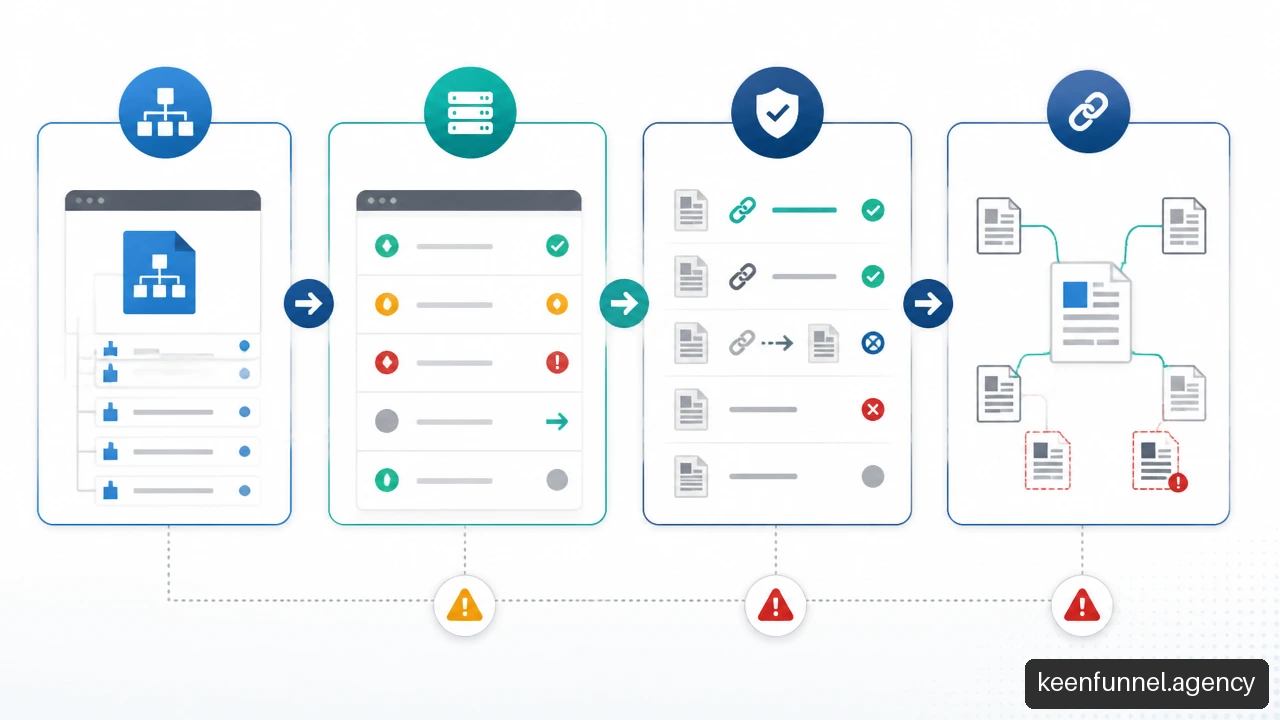
To audit a sitemap against your architecture, compare each listed URL with how it actually behaves: its HTTP status, canonical target, indexability, and internal links. That comparison reveals far more than checking whether the XML file loads.
Turn the sitemap into a quality dataset
For every sitemap URL, collect a small set of fields:
| Field | Question to ask | Typical problem revealed |
|---|---|---|
| HTTP status | Does the URL return a successful response? | Redirects, errors, or expired pages |
| Canonical target | Is the URL self-canonical or canonicalized elsewhere? | Duplicate URL inclusion |
| Indexability | Can the page be indexed? | Noindex directives or blocked resources |
| Internal links | Does the page receive meaningful internal links? | Orphan or weakly connected pages |
| Click path | Can users reach it through logical navigation? | Hidden content or poor hierarchy |
| Content segment | What template, locale, category, or status owns it? | Pattern-based operational failures |
This is a working methodology rather than a universal industry standard, but it is an effective way to find contradictions across systems that are often audited separately. Suppose a sitemap includes 500 location pages, and a crawl reveals that 200 canonicalize to regional hub pages, 75 are set to noindex, and 100 receive no internal links. The problem is not a missing sitemap but disagreement among the published URL inventory, canonical rules, and navigation model. If those pages support local search, pair the audit with a method for measuring Google Maps ranking and local visibility.
Resolve conflicting signals in order
Conflicting signals need investigation, not a blanket fix. This order usually works:
- Check the page purpose. Decide whether the URL should exist as an independent destination.
- Confirm the preferred canonical URL. If several URLs represent the same content, choose one preferred version.
- Check indexability. A page meant for search visibility should not carry an accidental noindex directive, which tells search engines to keep it out of results.
- Review crawl access. Confirm that robots.txt and other controls do not block resources needed to access the page.
- Validate internal-link support. Give important pages contextual and navigational paths where appropriate.
- Update sitemap membership. Include the final canonical, successful, indexable URL, not the retired or duplicate alternative.
HubSpot’s technical SEO audit guide supports including canonical URLs that return successful responses and are eligible for indexing. It also notes the per-file limits of 50,000 URLs and 50 MB uncompressed, which match the sitemaps.org protocol and Google’s sitemap documentation.
A word of caution: robots.txt is not a substitute for removing an unwanted URL from the sitemap. Listing a URL that you block from crawling sends mixed signals, and Google cannot see a noindex directive on a page that robots.txt blocks, so that page can still appear in results, for example when other pages link to it. Decide first whether the page should be accessible and indexable, then align the controls.
Measure what changes over time
Don’t measure success only by whether a sitemap was submitted. Track operational indicators continuously by segment, and compare them after releases, redesigns, and content launches. Useful indicators include:
- Sitemap URLs returning errors or redirects
- Sitemap URLs that canonicalize to another page
- Sitemap URLs with no meaningful internal links
- Indexable URLs missing from their intended sitemap segment
- Pages with unexpected noindex directives
- Indexation patterns by template, category, locale, or publication month
There is no broadly validated threshold for a “good” orphan rate or an ideal click depth. A 20-page site and a marketplace with two million products face different constraints, so the better question is whether the trend points to a clear ownership or template problem.
How to scale sitemaps for large websites
Large websites should split their URLs into several sitemap files grouped by meaningful segments and list those files in a sitemap index, a file that points to multiple sitemaps. Faceted URLs need an explicit indexation policy before any of them enter those files.
Use segmentation as an operations tool
Splitting is mandatory past the per-file limits, but segmentation pays off long before that because each group can be monitored on its own. HubSpot’s sitemap structure guide supports sitemap indexes, absolute URLs, and entries built around canonical, indexable pages. Common ways to segment include:
- Content type, such as articles, products, locations, help documents, or videos
- Geography, such as language, country, or regional site sections
- Template family, such as category pages, product detail pages, and editorial pages
- Publication state, such as current pages, migrated pages, or newly launched sections
The benefit is diagnostic clarity. If product URLs show a sharp rise in redirects while editorial content stays stable, the cause likely sits in a product feed, template, inventory rule, or deployment. A single all-purpose sitemap makes that pattern harder to isolate.
Model faceted navigation before indexing it
Faceted navigation lets visitors filter a listing by attributes, which helps shoppers but can generate a huge number of URL combinations. A clothing site may offer filters for color, size, brand, material, price, and availability, and those six filters alone can produce many variations, most with little unique value.
Do not add every filtered URL to the XML sitemap by default. First decide which filtered pages are durable search destinations with a clear user purpose and enough differentiated content. Use this decision model as a starting point:
| Filtered URL type | Likely sitemap decision | Reason |
|---|---|---|
| Curated category, such as women’s waterproof hiking boots | Consider inclusion | Clear intent and stable product group |
| Temporary inventory filter, such as items available today | Usually exclude | Changes often and may create thin page sets |
| Near-duplicate sort order, such as price low to high | Exclude | Changes presentation, not core content intent |
| High-demand brand and category combination | Consider inclusion after review | May serve a distinct audience need |
The right choice depends on the catalog, search demand, content quality, and your ability to maintain canonical rules. Where the evidence is unclear, start with a restrained indexation policy and monitor results rather than opening every filter combination to crawling.
How to protect web architecture during a migration
Treat a website migration as an architecture change, not just a redirect project, because it can break the structure even when redirects appear to work. The risk is highest when URLs, templates, language folders, or category structures change at the same time.
Before launch, build an inventory of the old canonical URLs with their intended destinations, redirect status, internal links, and sitemap segment. After launch, crawl both the new structure and the redirect map. Run the whole migration in this order:
- Freeze a pre-launch URL inventory and mark each URL as keep, redirect, consolidate, or retire.
- Map every retained topic to a new canonical destination.
- Update navigational and contextual internal links to point directly to the new URLs where possible.
- Publish replacement sitemap files that contain the new canonical, indexable URLs.
- Monitor error patterns, unexpected canonical changes, and orphan pages after release.
- Retire outdated sitemap files once the replacement structure is confirmed.
Temporary overlap may be necessary during a staged migration, but plan it. Leaving old and new URL sets in active sitemaps without clear redirect and canonical logic can prolong the confusion.
Checklist: keep your sitemap and architecture aligned
Start with these steps, then repeat the audit after every release, redesign, or content launch.
- Map your main user intents to a small set of hub pages, and confirm every important page has a route from one of them.
- Export every sitemap URL with its HTTP status, canonical target, indexability, internal links, and segment.
- Remove redirects, errors, noindex pages, and non-canonical duplicates from the sitemap.
- Link valuable orphan pages from relevant hubs, and consolidate, redirect, or retire the rest.
- Split large sitemaps by content type, locale, or template under a sitemap index.
- Set a faceted navigation policy before any filtered URL enters the sitemap.
- Before a migration, freeze a URL inventory and plan the replacement sitemap files.
How is a sitemap different from web architecture?
A sitemap lists URLs, while web architecture defines how pages are organized and connected through hierarchy, navigation, internal links, content groups, and URL relationships. An XML sitemap is one supporting part of that architecture: it contributes to crawlability and URL discovery, but it should reflect the intended structure rather than replace navigation, contextual links, or categories.
Should every page appear in an XML sitemap?
No. Include only URLs that are canonical, return a successful response, are indexable, and are meant for search discovery. Leave out redirects, error pages, duplicate versions, noindex pages, and low-value parameter combinations unless you have a specific reason to expose them. The file should work as a curated inventory, not a full export from your content management system.
What is the difference between an XML sitemap and an HTML sitemap?
An XML sitemap is a machine-readable file built for search engines, while an HTML sitemap is a visible page built for visitors. The XML version gives crawlers a structured list of URLs, and the HTML version offers supplemental navigation, which helps most on large or complex sites. Neither should replace the site’s main navigation or internal linking.
Can a sitemap fix poor internal linking?
No. A sitemap may help a crawler discover a page, but it does not create a useful route for visitors or show how the page relates to other content. Fix weak linking at the source by improving hub pages, category pages, contextual links, and breadcrumbs where appropriate, so important pages are reachable through logical navigation.
Should orphan pages be included in a sitemap?
It depends on whether the page is meant to be an independent search destination. If it is valuable, add meaningful internal links and include its canonical URL in the sitemap. If it has no user purpose or strategic value, consider consolidating, redirecting, or retiring it instead. Listing an orphan page without linking to it still leaves visitors with no route to it.
When should a site use a sitemap index?
Use a sitemap index when a site needs more than one sitemap file, because of URL volume or for operational segmentation. A single sitemap file can hold up to 50,000 URLs or 50 MB uncompressed, so larger sets must be split. Indexes are especially useful for ecommerce, multilingual, publishing, and enterprise sites that need separate reporting for different URL groups.
Can submitting a sitemap guarantee indexing?
No. Google calls submitting a sitemap “merely a hint” that does not guarantee Google will download the file or use it for crawling. Indexing depends on many factors, including crawl access, canonicalization, content quality, duplication, and the search engine’s evaluation of the page. Treat submission as the starting point for monitoring, not proof of indexation.
Sources and References
- SEO.com — Website Architecture for SEO: How to Improve Your Site Structure (seo.com)
- SEO Sherpa — Website Architecture: How to Structure Your Site for SEO and UX (seosherpa.com)
- HubSpot — Understanding Technical SEO: Audit Fundamentals (blog.hubspot.com)
- HubSpot — Sitemap Structure: How to Strengthen Yours for SEO and AEO (blog.hubspot.com)
- Search Engine Journal — How To Optimize Website Architecture For SEO (searchenginejournal.com)
- Sitemaps XML format protocol (sitemaps.org)
- Google Search Central: build and submit a sitemap (developers.google.com)
- Google Search Central: block search indexing with noindex (developers.google.com)
Ready to put this into practice?
Book a free 30-minute call. We will map where AI, automation and better data can make the biggest difference in your business, and what to do first.